15 April 2015

Robot Chef That Can Cook 2,000 Meals Set To Go On Sale In 2017

After a long, drawn out day in the office, it’s not always easy to motivate yourself to cook a
proper meal when you get home. Instead of reaching for the saucepan, many opt for the quicker and easier option of take-out or ready meals, many of which are not exactly healthy or particularly nutritious. But what if you could have a handy robotic assistant in the kitchen, ready to whip you up a gourmet meal whenever you so desire? That’s the dream of Moley Robotics, a London-based company that has developed a prototype “robochef” designed for the home.

Unveiled today at Germany’s Hannover Messe technology fair, the machine consists of two remarkably dexterous robotic arms installed atop a cooking area, complete with hobs, a sink and an oven. The robot’s sophisticated and fully articulated hands were created by Shadow Robot Company, another London-based firm, whose products are used all over the world, including by NASA. 

Rather than cooking like a machine, the system works by first recording human actions in 3D and then converting these into highly precise movements. The prototype was trained by chef Tim Anderson, who spent time whipping up original dishes in a motion-capture studio. During a demonstration, Anderson had the robot make a crab bisque, but he told BBC News it can do anything from a bit of prep to completing an entire dish.

According to Moley’s website, the firm hopes to bring a consumer version to market by 2017 that will feature several additions, including a library of thousands of recipes, a dishwasher and a refrigerator. This means you not only won’t have to cook or prep for yourself if you can’t be bothered, but you don’t even need to wash up afterward. Marvelous. You will even be able to control it remotely using an app, which means you could order your dish to be ready for when you get home.

Eventually, Moley hopes to produce a version complete with cameras so that users can teach it to create their own dishes, which can then be uploaded to a digital recipe library and shared with other people. They also want later models to be capable of dealing with tricky things like stopping mixing at the appropriate time to prevent splitting or over-beating.

“Something would change; we would see it in the sensor data. Maybe something gets stiffer or softer,” Shadow’s Rich Walker explains to BBC News. “We should be able to sense that and use it as the point to transition to the next stage of the cooking process.”

Of course, such sophisticated technology won’t come cheap, and will set you back close to $15,000 (£10,000), but hopefully the price will go down over time as with any new technology.

Source

Withings Activité activity trackers are beautiful, but limited

Withings’ Activité and Activité Pop used to only work with iOS devices, but now the company has finally introduced an Android version of its Health Mate app. As such, the company’s smart, fitness-tracking watches will now sync easily with Android smartphones.
Withings’ Health Mate app connects with either the Activité or Activité Pop via Bluetooth Low Energy. Once the watch syncs with the app, you can view your sleep metrics, activity, and set a vibrating alarm. The Health Mate app will show you your activity and sleeping patterns over time in handy graphs, too. The app will even track your weight, heart rate, and more if you enter the data, or happen to own Withings’ smart scale, sleeping system, and heart rate monitor as well.
When they first arrived on the market, the Withings’ Activité and Activité Pop were widely regarded as two of the most beautiful fitness-trackers around. Both feature a traditional wrist watch look. The original Activité is much more premium with its Swiss-made branding, real leather strap, polished stainless steel case, and sapphire watch face. However, it’s major downfall is its high $450 price.

Meanwhile, the Actvité Pop has all the same features, but it’s made with less high-end materials. The best part about the Pop is its low, $150 price tag. Now, both iOS and Android users can flock to Withings for attractive fitness trackers that look deceptively like high-end wristwatches.
You can download the Android version of the app on the Google Play Store and check out the Withings watches on their website.

14 April 2015

How To Un-root your any Android?

Well, now many people like to root their Android smartphones because it allows them to easily customize their Android smartphones. If you have a rooted android phone and want to unroot it, then you're at the right place. Here I gonna show you simple methods to unroot any rooted android smartphone However, after some time, you will feel frustrating and annoying when you don’t receive any kind of updates and your Android smartphone’s warranty will also be influenced or will be gone completely. For those of you wondering how to “unroot” any rooted Android smartphone or tablet, did you know that you can do that easily with 1-click using following methode.
So, if you want to revert back your Android phone to its original state then don’t worry because I have created this tutorial in which I will teach you that how you can easily unroot Android devices. You might be thinking that unrooting your Android phone will also be as difficult as rooting your phone but believe me it is pretty much easy, simple and safe also. So, without wasting much of your time, let’s get started with our tutorial.

Please Click on the Advertisements to support the blog!

Here I am going to use OTA RootKeeper app to convert my rooted device into unrooted device 

 Description of this OTA RootKeeper :

Free tool trying to protect root across manufacturer's OTA updates.
Also serves as temporary un-root Distributed as free of charge - no warranty. Open Source license: WTFPL.This application makes a backup or a protected backup of your device's root.
This device must already be rooted: THT OTA RootKeeper Newr doesn't have the ability to root devices.If several conditions are matched, THT OTA RootKeeper New OTA RootKeeper will make root survive OTAs and... pretty much well anything :) − except /system partition formatting.

Requirement of this app:
- /system partition as Ext2, Ext3 or Ext4
- Upgrades not formatting or overwriting completely the /system partition.

Typical systems where its perfectly effective:
- Nexus S
- Galaxy Nexus
- Every Honeycomb tablet
Typical system where the protection won't work:
- HTC Desire
- Samsung Galax

trick to convert rooted device into  Unroot Android Devices Easily

use bellow step by step procedure to unrooted your android device. 

step:1) First of all, you download OTA RootKeeper app 

step:2) Now, tap on Install button to download and install the app on your Android phone. Make sure that your phone has enough memory to install this app and if it doesn’t then try cleaning up some space on your phone.

  step:3)   After the app is installed successfully on your phone then tap on the Open button to use the app on your Android phone.

   step:4)  Now, tap on Temp un-root (Keeps Backup) button. Now, your Android phone is unrooted but temporarily. So, if you want to unroot it completely then tap on the Delete su backup button to revert back your Android phone to its original state.

That’s it! You are done! Now, you have successfully unrooted your Android phone completely.

08 April 2015

Microsoft's 'Redstone': An update to Windows 10 due in 2016

Microsoft hasn't even released Windows 10 to the general public yet, and the company is already talking about updates. According to a report from Neowin, Microsoft is preparing a series of updates codenamed 'Redstone' that will hit various devices in June and October 2016.
Like with Windows 10 itself, Redstone updates will be delivered to Windows Insiders ahead of their final release, giving enthusiasts a chance to trial the changes and notify Microsoft of any issues.
Microsoft isn't saying what features will be included in Redstone updates, as they build upon what Microsoft will deliver in Windows 10. The company is now hard at work fixing bugs and polishing features for the Windows 10 release, so any extra functionality that was planned, but didn't make it to the final release, will likely end up in Redstone.
It's also worth mentioning that Redstone is not the next version of Windows, but instead an update in the same mold as Windows 8.1 (codenamed 'Blue'). Redstone will target a whole range of devices and products, including Xbox, Surface Hub, HoloLens, Band, Office and smartphones.


Please Click on the Advertisements to support the blog!
In the meantime, Microsoft will release monthly updates to Windows 10 that include bug fixes, minor tweaks and small additions. The operating system is set to be released to the general public this summer.

07 April 2015

Detect Wi-Fi password using your phone! top 5 applications


Please Click on the Advertisements to support the blog!

There are thousands of companies around the world that provide free Internet access, you can use these networks, especially in the travel, without the need for using a 3 g or more. There are also shops, cafés, schools and others. So, to help you see this password WiFi networks, we have selected for you the best five apps in the Android system that you can use to find password WiFi for millions of places around the world.

1. Mandic Magi


Mandic magic is a free app for Android which offers you the possibility to discover thousands of Wi-Fi password in shops, cafes and businesses all over the world. Be shared and share passwords by users of the application, you can save your maps to access the passwords even when there is no Internet in your phone! Of course, you can learn more about this application by clicking here.

2.WiFi Map Pro


Is applications that identified previously in the professional code, and is a free application that offers you an easy way to discover thousands of Wi-Fi passwords for restaurants, supermarkets, cafes, and more. And the same strategy as earlier it relies on users to know and share passwords. You can learn more about him in this article.

3.Free Zone


Another application for the Android system, which you can use to find the password to millions of Wi-Fi spots all over the world. You can download passwords for access in the absence of an Internet connection on your computer.

4. WiFi


Is an application that allows you an easy way to discover and find out password for over 12 million points and WiFi all over the world. All passwords are shared by users and you can also see and watch sites passwords that are near you.

5. WiFi Finder


We finally to the last application is an application similar to that mentioned above, you can also discover the password to millions of Wi-Fi networks around the world, and you can also save passwords to access it after and select WiFi networks General near you.

Turn Off Your Android Phone Remotely

Why would you want to turn off your Android phone remotely,” you may ask? Well, there’s no set reason justifying such an action. However, possible reasons may include wanting to turn off your phone if it’s been locked in the office or your friend’s car for the night to conserve battery to last you through the next day, turning off your friend’s phone for fun, or simply for the novelty. Well, XDA Senior Member RavinduSha came out with an app called Remote Turn Off on the XDA Forums.
Remote Turn Off is a simple app, allowing users to remotely shut down the phone with the app installed. Requiring root access, the installation process consists simply flashing the provided zip file or moving the APK from the ZIP file to the /system/app folder manually and setting the correct permissions. To turn off the phone, users must text the phone number ‘power#off,’ with the first run requiring a permanent grant to root access by the app. The phone can be shut down with a text message from any phone number, however the shutdown code cannot be changed. There’s also no app icon in the app drawer, as not to add to the already cluttered and disorganized app drawer many users have.Remote Turn Off provides a function that may be useful for many users, but lethal if the code falls into the wrong hands, especially ‘pranktious’ friends. Originally developed for personal use, RavinduSha has made ‘Remote Turn Off’ available to all users for free. So if you would like to install this onto your phone, or your friend’s phone, remotely, for more details and download click here.

Please Click on the Advertisements to support the blog!

05 April 2015

Motorola new watch ‘Smelt’ could be a Moto 360 followup

Even though the Moto 360 was late out the gate compared to Android Wear devices like the Samsung Gear Live or LG G Watch, it’s still considered a first gen Android Wear device. While there’s a lot that we loved about the Moto 360 — as mentioned in our review — it did come with its fair share of shortcomings and thus, there was still plenty of room for improvement in a followup.

With OEMs introducing quality watch designs with solid aluminum builds, the Moto 360 is no longer the only fashionable — or most durable — Android Wear device on the market. We got a sneak peek at what Motorola could have planned for a Moto 360 followup after a Lenovo CEO posted an image to social media of what appeared to be an all new smartwatch housed inside a soft briefcase (Lenovo bought Motorola last year for $2.91 billion). Other than that brief look, not much else is known. That is, until today.

Please Click on the Advertisements to support the blog!

We received a tip from a popular app developer who recently noticed a mysterious Motorola-built Android Wear device pinging his Android developer console from Mundelein, a city not too far from Motorola’s HQ in Chicago, Illinois. The device is carrying the codename “Smelt” and is reportedly running Android 5.1. On the hardware front, it carries a screen resolution of 360 x 360 and is powered by an “armeabi-v7a.”

While we’re not too familiar with the word “smelt” outside the context “whoever smelt it, dealt it,” Webster’s also defines it as a “small silvery fish.” Makes sense given the original Moto 360 went by the codename “Minnow.”

Currently, Motorola’s only Android Wear device is the Moto 360 and only makes sense that this mysterious “Smelt” could be their replacement/sequel/followup for 2015. If that previous leak is anything to go by, we could be looking at a device that’s even more premium or luxurious than last year’s Moto 360.

At the very least, we’re hoping it’ll be better built as the plastic back on ours has already begun cracking. We’ll keep our eyes peeled for details.

Source

To our Audience from Russia: Сбербанк Онлайн

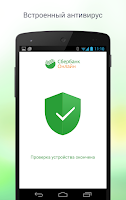
Вы просили, ждали, надеялись, и мы сделали это. Встречайте новый Сбербанк Онлайн для Android - самое безопасное банковское приложение в мире, в котором доступны платежи и переводы без шаблонов.

Мы встроили в мобильное приложение антивирус. Теперь вы можете совершать любые операции, зная, что ваши финансы в безопасности:

- Оплачивайте без комиссии услуги более 30 000 поставщиков, включая оплату мобильной связи, интернета, ЖКХ и штрафов.
- Переводите деньги десяткам миллионов клиентов Сбербанка из адресной книги приложения, зная только номер телефона получателя.


Гарантия безопасности является обязательным условием для такого кардинального изменения приложения, и, при возникновении любых опасностей, мы вынуждены ограничить функционал, предоставляя доступ к оплате услуг и внешним переводам только по шаблонам, созданным в веб-версии Сбербанк Онлайн.


Банковские услуги на Android еще никогда не были такими безопасными и удобными.

- Оцените высокий уровень безопасности ваших финансов, обеспеченный встроенной антивирусной защитой.
- Контролируйте остатки и движение средств по всем вашим картам, вкладам и кредитам.
- Узнавайте, на что вы тратите деньги, например, сколько вы потратили на кафе, одежду или отдых. 
- Переводите деньги на карту любому клиенту Сбербанка по номеру телефона из адресной книги.
- Оплачивайте без комиссии услуги более 30 000 поставщиков, включая мобильную связь, интернет, ЖКХ и штрафы.
- Сохраняйте и приумножайте, открывая вклады с повышенной ставкой, покупая валюту и драгоценные металлы, копите, создавая цели.
- Быстро находите ближайшее к вам отделение, банкомат или платежный терминал Сбербанка.
- Следите за вашим балансом «Спасибо», узнавайте, где можно потратить бонусы, просматривая партнеров «Спасибо» на карте.
- Моментально блокируйте любую карту.


К сожалению, мы не можем гарантировать достаточный уровень безопасности платежей и переводов в адрес произвольных получателей для телефонов с "root-доступом". Для клиентов, столкнувшихся с данной особенностью, мы оставляем возможность оплаты услуг и внешних переводов только по заранее созданным шаблонам.

Мы каждый день работаем над улучшением приложения. Если вы столкнулись с какой-либо проблемой или у вас появилась интересная идея, пишите нам на help@sberbank.ru

Recent changes:
В версии 5.3.0.2

Мы исправили несколько ошибок. Ждем ваших новых отзывов!

В версии 5.3.0.1

Вы просили, ждали, надеялись, и мы сделали это. Встречайте новый Сбербанк Онлайн для Android - самое безопасное банковское приложение в мире, в котором доступны платежи и переводы без шаблонов.

Мы встроили в мобильное приложение антивирус. Теперь вы можете совершать любые операции, зная, что ваши финансы в безопасности. 

Please Click on the Advertisements to support the blog!

Source

31 March 2015

App Mahal: Discover Best Android Apps - social network of Android apps

App Mahal is an exciting new way to discover and download the best Android apps and games without searching. There are millions of applications to choose from but finding the best free and paid games and apps is often difficult. This app creates a social community of app lovers who can share and recommend the best apps for their friends, family and followers. 


You can share your recommendations and likes with other members. We believe that by creating a social network of Android apps, users will ensure that the very best games and apps will shine above the rest.

App Mahal allows people to connect and follow each other. Users can connect their Facebook, Twitter and Google Plus accounts to view their friends’ apps and likes.

Please Click on the Advertisements to support the blog!

This may be what Tesla's mystery product is

CEO Elon Musk has already said the company is making batteries for your house

Tesla CEO Elon Musk said Monday his electric car company is unveiling a new product that’s “not a car” on April 30. It isn’t clear exactly what’s up Tesla’s sleeve — but there’s a strong case the new product will be a large battery that can power homes or businesses.
While Musk seems to be announcing big news here, he explained back in February that Tesla was working on a battery that collects energy from the sun during the day and stores it for use at night when people are home.
“We’re going to unveil the Tesla home battery, or consumer battery, that will be for use in people’s houses or businesses, fairly soon,” Musk was quotedas saying. He told more to Bloomberg: “We have the design done, and it should start going into production in about six months or so. It’s really great.”
Tesla has already been supplying home battery technology to its parter SolarCity, which has made them available in small parts of California. But Musk’s Monday tweet could be teasing greater availability for Tesla’s home battery technology.
If Tesla is indeed taking the lessons it has learned in battery design and applying them to home power, it could prove disruptive for utility companies. A Tesla-made home battery could help homeowners go “off the grid,” decreasing their reliance on local utilities.
General Electric, Samsung and Honda are also said to have similar home battery concepts in the works.
Tesla’s earnings for the previous quarter failed to meet analysts’ expectations. The company lost $.13 per share on adjusted revenue of $1.1 billion.

Please Click on the Advertisements to support the blog!

30 March 2015

Windows 10 Mobile on track for most Lumia phones

Microsoft's Operating Systems Group team has added code to the next test build of Windows 10 Mobile that will allow that release to work on the majority of Windows Phones.

When Microsoft released the first test build of Windows 10 Mobile in February, it was built to run only on a handful of Lumia devices, specifically the Lumia 630, 635, 636, 638, 730 and 830 phones. Microsoft execs attributed the small number of initially supported devices to the "very tight OS partitions" that left insufficient room for the installation process to update the OS in place.

But the second test build, which may not be available until the first week of April or so, will support the majority of existing Windows Phones. Microsoft officials went public with the list of Windows Phones that will likely be able to run the next test build in a March 27 blog post.

Stung by criticism over Windows 8, which turned off many PC users, Microsoft has made a concerted effort to get lots of people looking at preview versions of Windows 10, which is intended to run across a wide range of devices, from desktops to laptops to smartphones and even to devices like ATMs and ultrasound machines.

The aim of the test builds is to elicit comments, questions and complaints from Windows users, looking at the preview versions of the upcoming operating system, that could help Microsoft fashion a Windows 10 that will have a broader appeal than its predecessor, Windows 8. Windows 10 is intended to run across a wide range of devices, from desktops and laptops to smartphones and more industrial devices.

The initial list of Windows Phones, which isn't 100 percent locked, according to the post, includes these devices:

Lumia 1020 Lumia 1320 Lumia 1520 Lumia 520 Lumia 525 Lumia 526 Lumia 530 Lumia 530 Dual SIM Lumia 535 Lumia 620 Lumia 625 Lumia 630 Lumia 630 Dual SIM Lumia 635 Lumia 636 Lumia 638 Lumia 720 Lumia 730 Lumia 730 Dual SIM Lumia 735 Lumia 810 Lumia 820 Lumia 822 Lumia 830 Lumia 920 Lumia 925 Lumia 928 Lumia ICON Microsoft Lumia 430 Microsoft Lumia 435 Microsoft Lumia 435 Dual SIM Microsoft Lumia 435 Dual SIM DTV Microsoft Lumia 532 Microsoft Lumia 532 Dual SIM Microsoft Lumia 640 Dual SIM Microsoft Lumia 535 Dual SIM

(Several have noticed that the Lumia 930 isn't on this list. It seems there is some bug unique to the 930 that Microsoft is still trying to track down.)

The head of Microsoft's Windows Insider program, Gabe Aul, said that the required partition-stitching feature code required to support these phones came into Microsoft's main code branch late last week. Last week, Microsoft tested that code on individual devices inside the company. Aul also said the next test build will include support for phones that didn't have China Mobile operator support in the first test build.

"I cannot guarantee a date for a new build. What I CAN tell you is that we feel great here about the partition stitching code and current builds, but we likely still have at least one more week of engineering to do to ensure we get a great build for the expanded list of devices," Aul said.

Windows 10 will build in standards-based two-factor authentication to every device, effectively neutering most phishing attacks and password database breaches.

Source

WhatsApp working on online chat backups via Google Drive

According to reports, WhatsApp is now working on devising a way to make backing up chat history an easier process for its users.

Leaked strings from WhatsApp developers group suggest that it will soon integrate with Google Drive to backup chat history and media files. Users will also be able to restore history from Google Drive. Leaked screenshot from the developer group's string shows a timestamp for last backup to the Drive and an option to delete it.

The report also says that media backup option does not include backup and restore for video files. Users will only be able back up data on Google Drive through a wi-fi or cellular network.


Ford cars slow when they see speed-limit signs

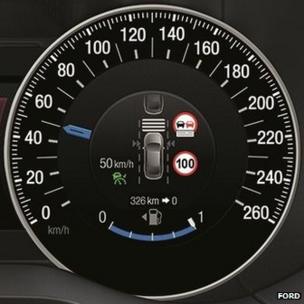
Speed limit dashboardFord is to sell a car that can read road signs and adjust its speed accordingly to ensure the vehicle is not driving too fast.
The speed-limiting tech can be activated via the steering wheel and briefly overridden by pressing firmly on the accelerator.
The car company suggests the facility will help drivers avoid fines and could reduce the number of accidents.
However, one expert said the innovation might only serve as a "stopgap".
"There's a plan for speed restrictions to be beamed to your car's computer systems and controlled from there, rather than requiring street sign visual recognition systems," said Paul Newton, an automotive industry analyst at the IHS consultancy.
"This would be part an extension of the networks that will connect vehicles, allowing cars to warn those behind them if they are slowing down, which is all part of a move toward autonomous vehicles that drive themselves."
The new vehicles will alert the driver to detected road signs via a read-out in the centre of the car's speedometer
Such a system, however, is some way off.
Ford's technology will become available to the public this August, when it launches the second generation of its S-Max cars in Europe.
A spokesman for the US car company told the BBC the facility would probably be extended to other models around the world.

Speed fines

The system, which is called the Intelligent Speed Limiter, combines two existing technologies already fitted to many cars:
  • Adjustable speed limiters - these use sensors mounted in a car's wheels to detect how fast it is going. Once software detects the vehicle is at a maximum preset speed, it limits the amount of fuel that reaches the engine, rather than applying the brakes. The system does, however, allow the driver to quickly suspend the restriction by pressing the accelerator pedal to the floor, letting them overtake another vehicle or avoid a collision
  • Traffic sign recognition - a forward-facing windscreen-mounted video camera scans the environment for road signs and alerts the driver to their presence. Ford cars previously fitted with this tech are limited to showing corresponding graphics on their dashboard displays
Drivers will be able to set the new system to let them speed at up to 5mph (8km/h) beyond the detected limit.
S-Max car
The new system will only be initially available with the S-Max car, which is limited to Europe
While some motorists might still resist the idea of giving up control to their vehicle, Ford suggested others would appreciate the convenience and safety on offer.
"Drivers are not always conscious of speeding... sometimes only becoming aware they were going too fast when they receive a fine in the mail or are pulled over by law enforcement," said Stefan Kappes, a safety supervisor at Ford.
"Intelligent Speed Limiter can remove one of the stresses of driving, helping ensure customers remain within the legal speed limit."
Ford noted that in 2013 more than 15,000 drivers in the UK had been issued with speeding fines costing £100 or more and that a motorist in Finland had been fined 54,000 euros (£38,400) after being caught driving 14mph (23km/h) over a 50mph limit.
It hopes that statistics such as this will help encourage consumers to spend extra money on the technology, which it has not included as standard on the basic S-Max model.

26 March 2015

Buy a Lumia & Fly - Crazy True Offer! - with Air Asia


Fancy getting a trip just from your smartphone purchase? AirAsia is making this possible with this promo for each
purchase of a Lumia 532 or 535.
The promotion is valid from the 20th March to 30th April, and the purchase will net you 5000 points of AirAsia Big and a return ticket to Singapore, Krabi or Phuket.

All you need to do is follow these simple steps after you’ve purchased your Lumia device, key in your IMEI number, Big Shot ID email (if you haven’t one, register for one) plus some other details and you’re well on your way towards redeeming your ticket.
If this interest you, head over here for more details. Don’t forget to read the full terms and conditions.

Please Click on the Advertisements to support the blog!


My opinion: Buy the Lumia and Keep it Packed, Fly, Return Home, Sell the Lumia and Get Galaxy S6 or HTC M9! 

WhatsApp Voice Calling for iPhone! Simple Steps to Activate the Feature

WhatsApp is gradually rolling out voice-calling to select users as part of its beta testing phase, ahead
of its official launch. But, users of the world's most popular instant messaging app are growing impatient and looking for ways to get the feature working as soon as possible. The voice-calling is largely tested on Android, leaving the iOS device owners wondering when and how to get it on iPhones. To free iOS WhatsApp users from the extended agony, here's a simple guide to get the feature activated on their devices too.

 WhatsApp Voice Calling For iPhone; 4 Simple Steps To Activate The Feature, Jail Break Required
4 Easy Steps To Activate WhatsApp Voice Calling on Jail broken iOS Devices. WhatsApp hasn't started rolling out its voice-calling to iOS-powered devices, but a recent update added the call button sans the calling function alongside other changes. This intensified users' anticipation for the much-awaited feature. Thankfully, iPhone users won't have to wait any longer as a Reddit user Akish Gupta (akishgupta95) found a tweak that will let you use the feature by following a few steps. Note that the steps menioned below will only work on jailbroken iPhones, The Fuse Joplin reported.

How To Activate Voice-Calling On Your iPhone?

Step 1. Download and install WhatsApp beta 2.12.0.1 on your iPhone.

Step 2. Add iMokholes repository to your list of Cydia sources. To do so, launch Cydia after installing WhatsApp and add the repository code "apt.imokhles.com" to Cydia sources.

Step 3. Install WhatsAppCallEnabler by going into the Settings of the app.

Step 4. Contact a friend who has the voice-calling activated and request him/her to make a call to you.

These steps will activate free voice-calling on your iOS WhatsApp app. Note that this method is not approved by Apple or WhatsApp and this article does not promote jailbreaking of your iPhones. Once the feature is fully tested to WhatsApp's satisfaction, users of the messaging app across all platforms will be treated with voice-calling through an OTA update.

Source

WhatsApp Calling Goes Live For Everyone Again

A few weeks ago, WhatsApp's Call feature made a small appearance for a few users, but at the time
almost no one was able to trigger it reliably and keep it activated. The company appears to have flipped a few switches in its servers and the function is confirmed to work for those running version 2.11.528 from the Play Store, or 2.11.531 from WhatsApp's website.
A few users have emailed us reporting getting the function activated over the past hours, more accurately, the trigger that enables the feature has to be the reception of a call from someone who already has it. (Or maybe this terminal trick still works, I'm not sure.) Once that happens, WhatsApp's UI switches (either immediately or after you exit and reopen the app) from just showing chats, to a 3-tab layout with calls, chats, and contacts.

Calls are well integrated in WhatsApp. The dedicated tab shows incoming, outgoing, and missed calls with precise timing. Ongoing calls stay in the notification panel until you hang up while missed calls leave a notification that you can later check out. While on a call, you can activate the loudspeaker or mute the microphone. If you open your text chats with any contact, a call button appears in the action bar, right next to the attach icon and the menu, to make it easier to talk to them. And finally, if you click a contact's avatar, you now get a bigger profile image with the options to message or call them, or view their information.
The call button for all contacts now defaults to a WhatsApp call instead of going through your phone. I can't find a way to trigger a regular network call from the app, which is a bit annoying because you might be in a spotty area or your contact might be offline. (For the record, in this case, the WhatsApp call still rings for a while, no one answers, and then gets disconnected. When the person goes back online, they see it as a missed call.) You'll have to go to your regular Phone app to initiate a network call.

When you're lucky enough to receive a WhatsApp call from a friend, you can go on enabling the feature by calling your other contacts. If they're running an older version of the app that doesn't support it, you will instantly see a message notifying you of that so you can tell them to update their app before you call them. Now all you have to do is cross your fingers and hope that someone shares the riches with you so you can spread them further.

Source